Tue, 09 Sep 2014
Building Multi-Container Apps with Panamax
CenturyLink released a new open source tool for building and managing applications composed of multiple docker containers called Panamax. It's similar to fig in providing a file format for describing the docker images which make up your application, and expressing the links between the containers.
The files used by Panamax to describe an application are called templates, and Panamax expands upon the model provided by fig by allowing applications to be built from existing templates, i.e. collections of existing images, and by providing a web interface for building templates. Templates can be fetched from and export to any github repo.
You create a new Panamax application by using an existing template or starting with a single docker image from Docker Hub.
Building an app using a template
Below I provide an example of how to build an application using a Panamax template. I created a template for the Cube event-logging and analysis server. (There's also a copy of the template in the panamax contest repo, but it was built using a MongoDB image which has since been deleted from Docker Hub.)
We'll create a simple Hello World node.js app, which logs each request to the cube server.
Install Panamax
First, install Panamax as
described in the documentation. The current version of Panamax is distributed
as a Vagrant VM, running CoreOS. Panamax itself is three docker apps
that run in the VM: an API server, a web app that provides the main interface,
and cAdvisor, used to monitor
the docker containers. Panamax also includes a shell script,
panamax, which is used to start up the VM.
Add a Panamax Template Source
Panamax is distributed with two github repos containing templates. Navigate to
Manage | Sources to add my cwarden/panamax-templates repo as a
source of templates.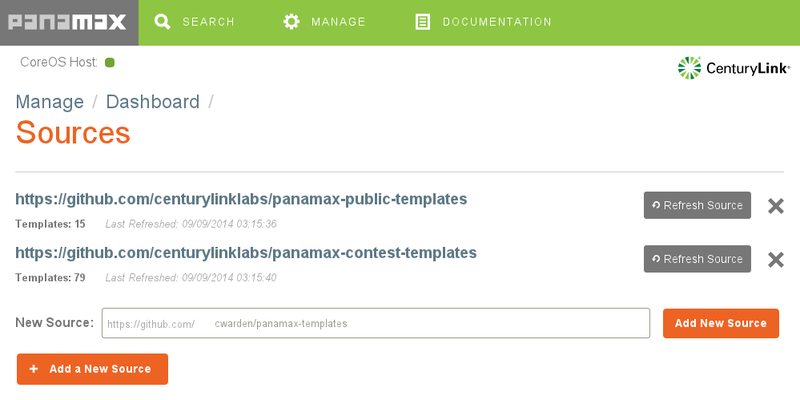
Searching for Panamax Templates and Docker Images
Now, on the search screen, if you search for "cube", you'll find my template.
(The first one is from the contest repo.)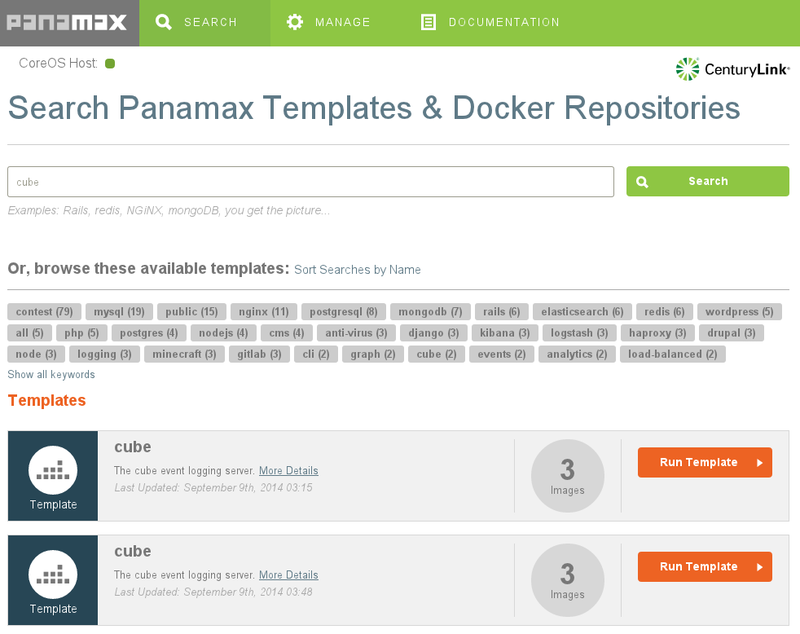
Below the templates, you'll also find individual docker images. If you wanted to build up your application starting from a single image, you could start with one of these.
Click on More Details, and you'll see that my template is made up of three docker images: a MongoDB database, the cube collector, which accepts events and stores them in the database, and the cube evaluator, which reads data out of MongoDB and computes aggregate metrics from the events.
The details modal window also shows documentation I wrote up when creating the template.
Creating an Application
Click on Run Template. This will create a new application called "cube".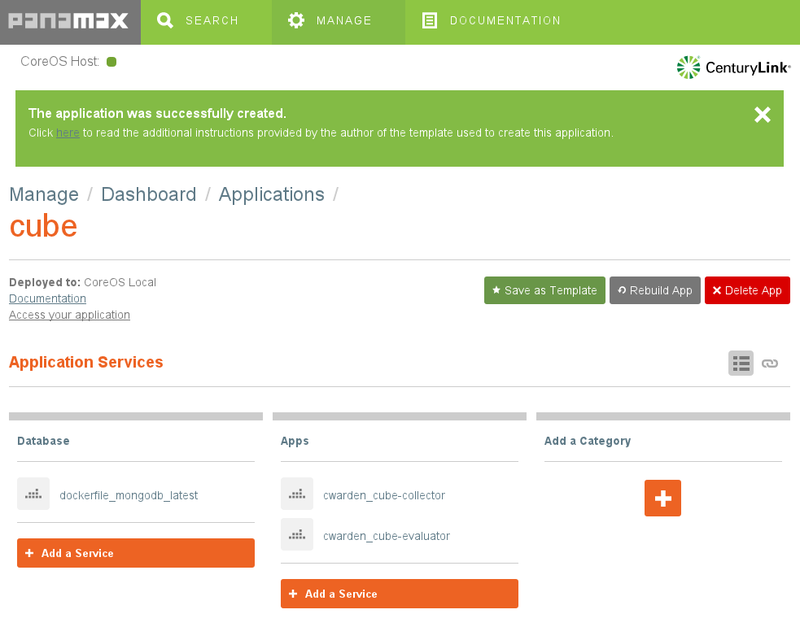
The Documentation link will show the same notes as on the More Details screen. The Port Forwarding section is important. Recall that Panamax and all of the docker containers it manages are running within a VM. If we want to access any of the services provided by these containers from outside the VM, we need to set up port forwarding.
In this case, we're going to add another docker container which sends data to the cube collector, but we'll want to access the cube evaluator from our host machine to make sure the logging is working correctly, so we need to set up port forwarding to VM for the evaluator:
$ VBoxManage controlvm panamax-vm natpf1 evaluator,tcp,,1081,,1081
(Instructions for sending data to the collector from the host machine are also included in the documentation.)
Prepare An App To Use With The Template
We'll use Valera Tretyak's simple hello world app for our application, making a small change to log each request to the cube collector.
Then we can create a docker image for this app and upload it to the Docker Hub.
$ docker build -t cwarden/hello-cube .
$ docker push cwarden/hello-cube
Extending The Template To Create a New Application
Now, let's actually use the template as a template by adding our new image as
another container. From Manage | Manage Applications | cube, let's add the
hello-cube service.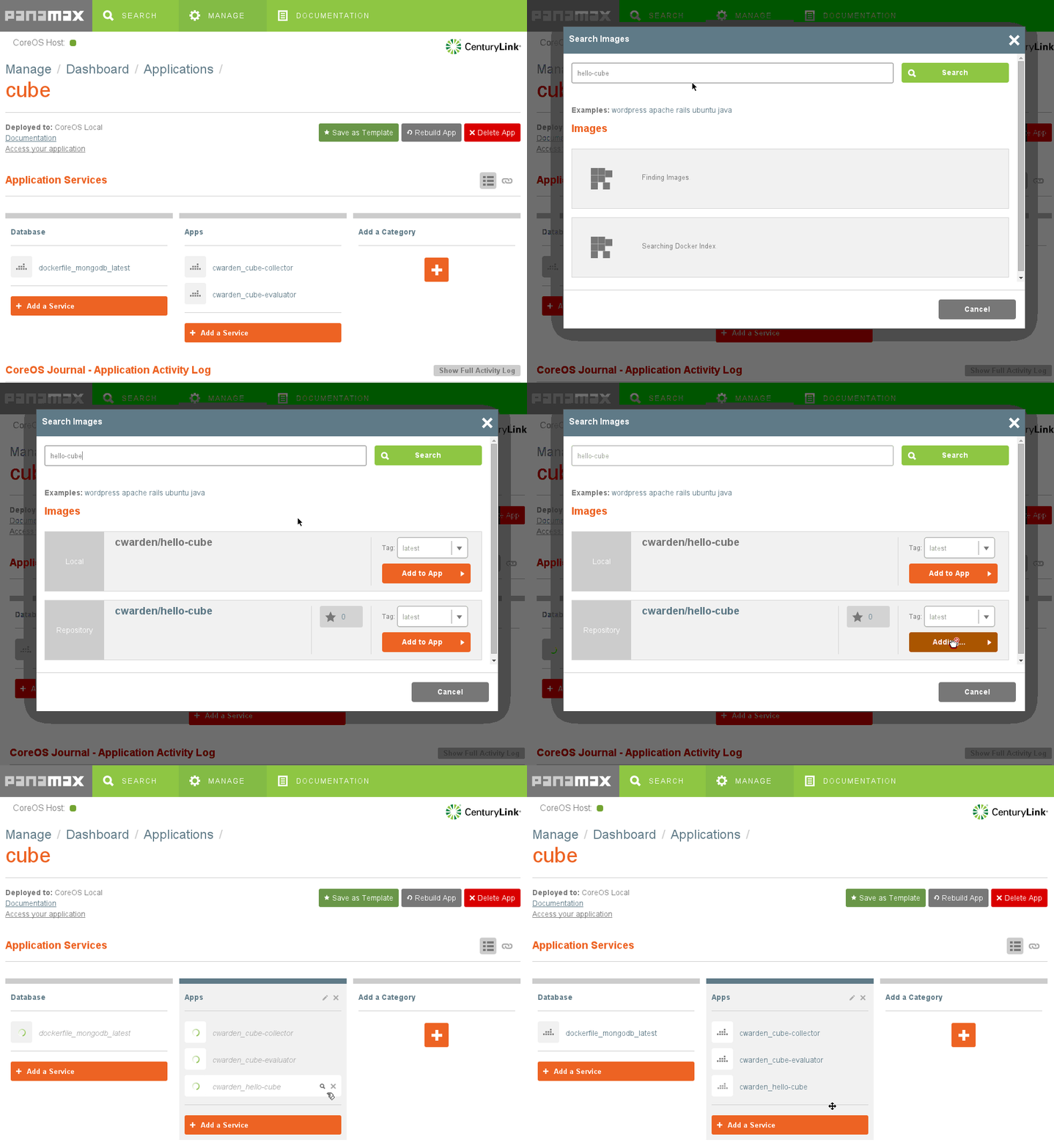
Next, we need to link the new container to the cube collector so it knows the
hostname and port to use when sending events. We also need to expose the
container's port to the VM. Click on the hourglass next to the hello-cube app.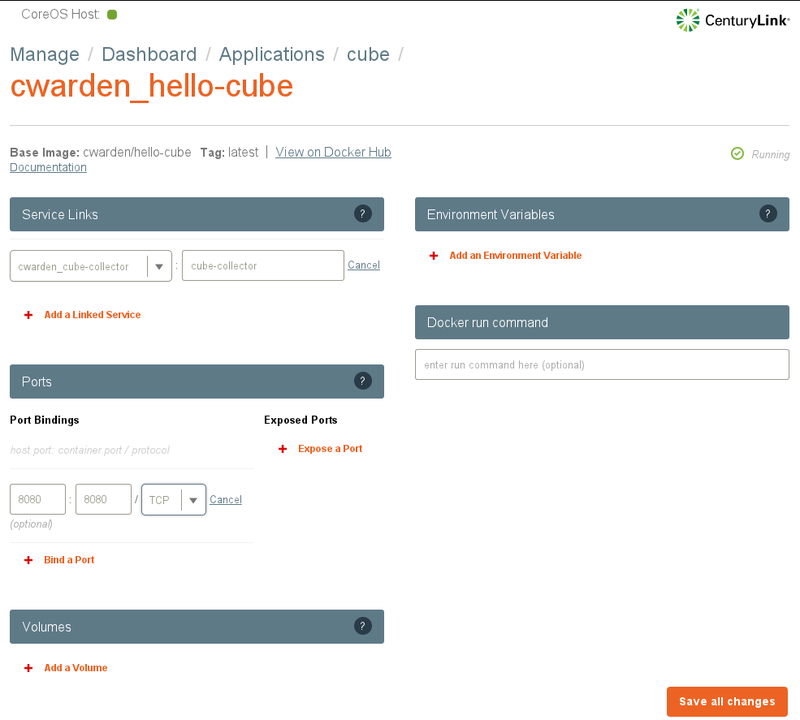
And we need to expose the VM's port to the host machine.
$ VBoxManage controlvm panamax-vm natpf1 hello,tcp,,8080,,8080
Using The New App
When we access the app on localhost:8080, it will send an event to the cube collector. We can use the cube evaluator to monitor the number of events being generated.
Exporting An App As A Template
Now that we've finished building our app, we can export the app as a new template to a github repo using the Save as Template button.
Thu, 08 Aug 2013
GreatVines Development Methodology
In response to a customer's request for roadmap details, and not having the project artifacts they expected based on how they manage internal projects, I've written up a description of the development methodology at GreatVines.
Axioms of Software Development
The GreatVines development methodology follows from a few high-level axioms, draws from multiple software development and project management methodologies, and makes use of modern tools for collaboration.
The axioms:
- Requirements Change
- Priorities Change
- Delivering Useful, Working Software Frequently Is Our Primary Goal
- Delivering Updates to our Software is Cheap
The first two items, changing requirements and priorities, are related, and mean that we don't expect to be able to predict the future more than a few months out. We generally have a good sense of which new features customers want to make use of next month, but not those that will be most useful next year. Additionally, as we deliver new features to customers, requirements for enhancements to these features become apparent as we get feedback from them.
Item 3, delivering quality software, stands on its own. These first three items reflect what we think are the most important principles from the Agile Manifesto.
Item 4, that the delivery of updates is cheap, follows from the fact that we are a software-as-a-service company. The days of shrink-wrapped software are gone, and updates to both our web-based and mobile applications are delivered without end-user intervention. Because delivering updates is cheap and requirements change, we are able to deliver multiple iterations of new features, and adjust requirements as we discover exactly how customers are using our software and how they would like to use it.
Therefore, we aim to deliver useful, working software frequently under the assumptions that requirements and priorities change regularly, and that delivering updates to our software does not impose a large cost on either GreatVines or our customers.
Process
We generally organize releases into three- to four-week cycles, similar to Scrum sprints, but try to keep the next two to three releases planned as well so we're looking two to three months down the road. Like scrum and kanban, we start from a backlog of features that we would like to implement. We bring together team members from development, support, implementation, and sales when prioritizing the tasks for future releases.
Each release typically has a combination of small tasks, which may already describe a combination of technical requirements and planned implementation details, and larger tasks, the requirements for which need to be further elaborated.
In preparing the bigger tasks for an upcoming release, we work to ensure the requirements are clearly defined so development can proceed. Features that require a new user interface or significant changes to an existing interface are mocked up. There are often a few iterations of mockups, as questions are raised and addressed, and the requirements and mockups updated.
Depending on the feature, we occasionally share the mockups with existing or potential customers, and solicit their input before starting development, but we generally prefer to implement a working interface, then adapt it as we get feedback from real use.
As the requirements are fleshed out, we break them down into development tasks, referencing the mockups and relevant requirements. Each task is estimated by the developer that will be responsible for writing the code.
The tasks within a release are prioritized so if there is any slippage, the highest priority tasks get completed first. The assignment of prioritized tasks to developers ensures that each developer knows which task they should be working on at any time, and helps collaboration by letting all members of the team know who is working on what and how the priorities are defined. As in kanban, it also limits the amount of work-in-progress.
During development, we try to ensure the quality of the software through developer-written tests and peer review. For both our web-based applications running on the Force.com platform, written in Apex, and our mobile app, written in javascript, we make extensive use of unit tests. Although we don't follow a test-driven development process per se, we try to take a test-first approach with bugs; for new features, we typically write tests either in parallel with implementation code or subsequent to it.
We have found that testable code is better code. If it's hard to test, it's probably poorly designed, and needs to be decomposed.
During peer review, both the tests and implementation code are reviewed. We look for areas in which the design of the software can be improved as well as ensuring that the code follows our internal coding conventions to ease future maintenance.
With our mobile app, we have started writing automated functional tests as well as unit tests. The goal is to have the tests fully specify the functionality of the application.
When a new version has been released, our release notes are updated.
Tools
There are a couple important tools we use to support our development process. We use LiquidPlanner as our project management tool. Each release is organized as a package. We have our web-based application and mobile applications organized as separate projects, broken down into broad features using folders within the projects. We pull tasks from both projects into a release package.
Mockups for new interfaces that will be built as part of the release are done at wireframe level like one would do in Balsamiq Mockups. (Our mockups are actually often done as Google Drawings because Jim typically does them, and he has somehow become proficient at creating them quickly as Google Drawings.)
The use of ranged estimates in LiquidPlanner allow us to organize releases with a fair amount of confidence in being able to hit delivery dates. Estimating software development tasks is a continuing challenge, but we find the confidence interval-based approach superior to point estimates often used in project management tools and story-point estimates used in scrum. In the backlog, we often put wide estimates on broadly defined tasks, when it's not yet clear the value of the information provided by more granular requirements and estimates. When organizing a release, we break down big tasks into smaller ones, generally around one- to six-hours. Smaller tasks are easier to estimate more accurately, and estimates improve with practice.
LiquidPlanner also serves as a collaboration tool, minimizing project management overhead. As discussed above, the priority of tasks is unambiguous. We keep estimates of remaining work on tasks up to date, and LiquidPlanner automatically updates the schedule. Discussion about task details happens within LiquidPlanner so if there's a change to or clarification of requirements, there's one place to look. (When real-time discussion is required, we generally use Google Hangouts, then record the result of the conversation in LiquidPlanner.) Using LiquidPlanner mostly eliminates the need for "what's the status?" discussions.
We also track the status of code reviews and whether the code for each task has been merged within LiquidPlanner.
We use git and GitHub for version control. Our use of github follows how most open source projects are organized. We have a greatvines organization, which contains the primary repo, from which we package our software. Each developer has a fork of the repo. Developers create feature branches for individual LiquidPlanner tasks, and open a pull request against the greatvines repo when the code is ready to be reviewed. The pull request is noted in LiquidPlanner and the task is moved to a ready-to-review package, which puts the task on hold (not scheduled for further development).
Peer review is done within GitHub, using inline comments on the open pull request. If the task needs further work, the task is moved out of the ready-to-review folder in LiquidPlanner so it's scheduled for additional work. When the pull request is merged, the task is marked done.
Future Improvements
There are a couple areas in which we are planning improvements to our development process around testing. We are using jasmine and jasmine-jquery to do some functional testing of our mobile app, but it's not exhaustive, and we don't have anything similar in place for our Visualforce interfaces. Therefore, we augment our automated testing with manual testing. We would like to add more robust automated functional/acceptance testing, perhaps using a browser automation tool like selenium or casperjs.
As we further automate testing, we also plan on introducing continuous integration. Travis CI looks promising here, with tight integration with GitHub, and extensive use among open source projects already.
There are a couple areas in which we might experiment with changes in process in the future. One is in choosing which features should go into each release. We currently use a consensus building approach in which we informally consider the value of possible enhancements to our customers. I'd like to investigate whether there might be gains to be had from the use of more formal Decision Analysis practices.
We might also experiment with scrum-style user stories for documenting requirements. For the most part, our lack of a formal requirements documentation structure has not been a problem, and we are able to turn requirements into technical designs easily. But in cases where requirements are very broadly defined, the "As a user, I want" structure may prove valuable. Using a standard structure may also ease on-boarding of new employees and coordination with any contract or outsource developers with which we work.
Fri, 31 Aug 2012
Fixing "emulator window was out of view and was recentered"
Every time I tried to start an Android emulator, the window appear briefly,
then disappear, and I'd get the error, "emulator window was out of view and was
recentered". The solution is to edit emulator-user.ini in the
avd's directory, $HOME/.android/avd/<image name>, by
default, on linux. Set window.x and window.y to 0.
The solution is on stackoverflow, but Google couldn't find it.
Update 10/05/2012: I've found this solution to work inconsistently. A better solution under xmonad is to set up a ManageHook to match the emulator window and move it to the floating layer:
myManageHook  = composeAll
	[ className =? "emulator-arm" --> doFloat
	]
Sat, 11 Aug 2012
Kanban for Salesforce
Based on my previous Force.com app for managing Salesforce Cases on a Kanban board, I've built Kanban for Salesforce, a project management tool on the Force.com platform. It uses a custom object for cards so it's not tied to an existing Salesforce native object. Cards can be organizated into sprints.
I've built a proper website for it, and there's an online demo. Check it out at octoberswimmer.com.
tech » salesforce | Permanent Link
Mon, 25 Jun 2012
Kanban Cases Board Updated for Multiple Filters
 I've updated my kanban
tool for Salesforce Cases to allow filtering Cases by multiple criteria.
In addition to Owner, you can now filter by the age of the Case, the Priority,
and the Type.
Install CaseBoard Install to a sandbox
tech » salesforce | Permanent Link
Tue, 22 May 2012
Kanban Board for Managing Salesforce Cases
 I've started building a tool to manage Salesforce Cases on a kanban board.
Each case is a card, and each Status picklist value is a list on which the
cases can be organized. You can drag cases around to prioritize and track
progression.
The lists are organized left-to-right in the same order that the picklist values are arranged top-to-bottom. There's a custom setting to treat the first picklist value, typically "New", as your backlog. The backlog is hidden by default, and can be shown by clicking the arrow on the top left.
If you use Salesforce Cases, please try it out. I would love to get some feedback and suggestions for features. It's still early in development, but I was able to get off to a good start on the front-end by adapting code from huboard, a great tool for managing github tickets.
Install CaseBoard Install to a sandbox
This is also my first time trying to build my own commercial application on the force.com platform. Thoughts from anyone who has sold applications on the AppExchange would also be appreciated.
Update 2012-05-27: Added better handling of many open Cases.
Update 2012-06-24: Now supports filtering by multiple criteria.
Update 2012-08-11: I've developed a new project management tool not tied to native Cases, Kanban for Salesforce.
tech » salesforce | Permanent Link
Fri, 11 May 2012
git diff for Salesforce static resources
Static Resources in Salesforce are often zip files containing multiple files. If you're keeping static resource under version control using git, here's how to get useful diffs for them whether they are zip files or single text files.
Create a shell script which will identify whether a file is a zip file or not.
If so, it should unzip the contents to stdout; otherwise, it should just output
the contents of the file. I called it resource-conv.
#!/bin/bash

file -b --mime-type $1 | grep application/zip && unzip -c -a $1 || cat $1
Tell git to use this conversion utility for a new "resource" diff driver:
$ git config [--global] diff.resource.textconv resource-conv
Tell your repo that .resource files should use the "resource" diff driver by
adding the following to your .gitattributes:
*.resource diff=resource
tech » salesforce | Permanent Link
Tue, 20 Dec 2011
Host a Debian Package Repository on S3
The following steps can be used to create a debian package repository easily and host it on Amazon Web Services S3.
First, install reprepro, which will create the repository file structure from .deb packages. Also install s3cmd to sync a local copy of the repository to s3.
$ sudo apt-get install reprepro s3cmd
Create a directory for the repository and a conf sub-directory.
$ mkdir -p /path/to/my-repo/conf
Create the config file, conf/distributions, describing the repository. Setting Codename, Components, and Architectures are sufficient to get started. If your packages are specific to a Debian distribution (or other Debian-based distro like Ubuntu), you can set Codename to the code name of the distro, e.g. squeeze. It should not be set to stable, testing, or unstable; these can be set in the Suite option. See reprepro(1) for more details.
Codename: example
Components: main
Architectures: i386 amd64
Add a package to the repo using reprepro.
$ reprepro -b /path/to/my-repo includedeb example /path/to/package.deb
Here are the contents of the repo after adding one package:
my-repo/
my-repo/pool
my-repo/pool/main
my-repo/pool/main/m
my-repo/pool/main/m/mypackage
my-repo/pool/main/m/mypackage/mypackage_1.0_all.deb
my-repo/dists
my-repo/dists/example
my-repo/dists/example/main
my-repo/dists/example/main/binary-i386
my-repo/dists/example/main/binary-i386/Packages.gz
my-repo/dists/example/main/binary-i386/Release
my-repo/dists/example/main/binary-i386/Packages
my-repo/dists/example/main/binary-amd64
my-repo/dists/example/main/binary-amd64/Packages.gz
my-repo/dists/example/main/binary-amd64/Release
my-repo/dists/example/main/binary-amd64/Packages
my-repo/dists/example/Release
my-repo/conf
my-repo/conf/distributions
my-repo/db
my-repo/db/packages.db
my-repo/db/release.caches.db
my-repo/db/checksums.db
my-repo/db/version
my-repo/db/references.db
my-repo/db/contents.cache.db
Configure s3cmd with your AWS credentials:
$ s3cmd --configure

Enter new values or accept defaults in brackets with Enter.
Refer to user manual for detailed description of all options.

Access key and Secret key are your identifiers for Amazon S3
Access Key [XXXXXXXXXXXXXXXXXXXX]:
Secret Key [XX+XXXXXX+XXXXXXXXXXXXXXXXXXXXXXXXXXXXXX]:

Encryption password is used to protect your files from reading
by unauthorized persons while in transfer to S3
Encryption password:
Path to GPG program [/usr/bin/gpg]:

When using secure HTTPS protocol all communication with Amazon S3
servers is protected from 3rd party eavesdropping. This method is
slower than plain HTTP and can't be used if you're behind a proxy
Use HTTPS protocol [Yes]:
You can leave the encryption password blank; you don't want to encrypt the files in the repository.
Create a bucket in S3 and sync your repository to the bucket. The bucket name must be globally unique. You will get an error if you use the name of an existing S3 bucket.
$ s3cmd mb s3://my-repo/
$ s3cmd --verbose --acl-public --delete-removed  sync /path/to/my-repo/ s3://my-repo/
Note the trailing slash after /path/to/my-repo. Without it, the my-repo folder itself will be created in your bucket.
Add the repository to your sources.list:
deb http://my-repo.s3.amazonaws.com example main
Now you can install packages from the repository:
$ sudo apt-get update
$ apt-cache policy mypackage
mypackage:
  Installed: (none)
  Candidate: 1.0
  Version table:
     1.0 0
        500 http://my-repo.s3.amazonaws.com/ example/main amd64 Packages
Tue, 15 Feb 2011
Resetting Chatter Desktop Configuration on Linux
Configuring Salesforce Chatter with an account in an org that doesn't have Chatter enabled results in an unusable app. Upon start-up, it authenticates against the org, shows an error, "Chatter is not enabled for this organization", then exits.
To restore Chatter to a state where it prompts for the org type, Default or Sandbox, I had to remove the Encrypted Local Store used by AIR apps.
$ rm -rf ~/.appdata/Adobe/AIR/ELS/sfdc-desktop.*
tech » salesforce | Permanent Link
Wed, 03 Nov 2010
Find Email Messages with No Responses
Today, I was trying to find email messages that I had sent which haven't had any responses. My MUA is mutt and my mail is stored in Maildir folders. This could be done with a fairly simple shell script using find and grep, but with about 40,000 messages in the one folder I wanted to search, I was looking for at least a slightly more elegant solution.
The idea is to find messages I had sent (to a specific recipient in this case) and extract the Message-Id; then for each Message-Id, search for messages with that Message-Id in their In-Reply-To or References header. If no messages are found for this second search, we conclude that no response has been received.
I ended up writing a simple shell script that makes use of mairix, which indexes each of the three fields I need to search. Unfortunately, mairix doesn't allow searching the In-Reply-To or References headers directly, but does provide a way to return all of the messages within the same thread as messages returned as a search result. This allows us to restrict the number of messages searched in the second pass to a single thread instead of the entire mailbox.
See the script below:
tech » mail | Permanent Link