Tue, 11 Nov 2014
Net Neutrality
Thinking past hop 1
I had a great idea a few days ago, to start a website streaming cat videos called Petflix. I rented a server for $10/month that gave me 1Mbps of outbound bandwidth.
Growth has been exponential. I now have 20 customers that now pay me $1/month for streaming cat videos. Unfortunately, during peak cat video viewing hours, I've started getting complaints that the video streams are choppy.
Each stream uses 100kbps. So when I get more than 10 concurrent viewers, I max out my bandwidth, and packets start getting dropped.
I could buy another 1Mbps of bandwidth for $10/month, but that would make my website unprofitable. So I came up with a brilliant idea that would keep this operation going.
I have an old computer in my basement that I'm not using. I called up Comcast and offered to send them my computer, preloaded with all of my cat videos. They could install it in their data center, and I would configure my DNS servers to send all of my traffic originating from Comcast customers to the computer in their data center. Since 90% of my customers are on the Comcast network, I can grow my website without incurring any additional bandwidth costs.
Obama on net neutrality
The recent statement by Barack Obama on net neutrality suffers from the same error that most proponents make in arguing for net neutrality. It assumes away the problem of how the internet actually works.
Packets don't magically appear on an ISPs network, ready for the ISP to either send on to a customer, or throttle or block for some nefarious reason.
The Internet is a big interconnected network with lots of different agreements for connecting two networks together. As the owner of Petflix, I pay Tektonic for connecting my virtual server (which I also pay them for) with their network. Tektonic pays to connect their network with TierPoint (and for power and space in a data center). TierPoint pays to connect their network with Level 3. Level 3 and Comcast connect their networks, but the terms are contentious. And as a customer of an ISP, I pay for connecting my home network with Comcast.
Traditionally, large networks like Comcast and Level 3 would form settlement-free peering agreements. Both parties get about equal value out of connecting their networks, and it was deemed mutually beneficial to connect their networks without one party paying the other. Netflix started sending lots of traffic over the connection between Level 3 and Comcast, and Comcast no longer thinks they are getting equal value from peering, and wants to renegotiate so Level 3 pays them.
To be fair, Obama sort of recognizes that the problem isn't just between the ISP and their customers. One of his bullet points argues that net neutrality should apply between an ISP and other networks.
- Increased transparency. The connection between consumers and ISPs - the so-called "last mile" - is not the only place some sites might get special treatment. So, I am also asking the FCC to make full use of the transparency authorities the court recently upheld, and if necessary to apply net neutrality rules to points of interconnection between the ISP and the rest of the Internet.
But if we apply the other rules of No Blocking, No Throttling, and No Paid Prioritization to the connections between ISPs and other networks, it's unclear what kind of arrangements would be legal. Would the government have to mandate the amount of bandwidth at these interconnects?
What We Talk About When We Talk About Bandwidth
Getting back to my parable, when a customer of Comcast pays for 20Mbps of bandwidth, and they can't even get 100kbps of throughput to Petflix, whose fault is it?
Is it Comcast's responsibility to ensure that there is enough bandwidth through Level 3, TierPoint, Tektonic, and Petflix?
Is it Petflix's responsibility?
Fortunately, we have a pretty good way of sorting it out: markets. If Petflix is so important to Comcast customers that Comcast will lose customers to competitors by not providing a satisfying cat video viewing experience, Comcast will likely work to ensure sufficient bandwidth is available, unless the cost to do so makes those customers unprofitable.
If Petflix customers start cancelling their subscriptions because they can't enjoy my videos, I will probably pay to ensure sufficient bandwidth is available, unless doing so makes the operation no longer profitable.
Net Competition
I'm sure readers will object that Comcast is nearly a monopoly in most markets, and therefore markets won't solve the problem. And I agree. So instead of championing net neutrality, I encourage readers to champion net competition.
Instead of adding federal regulation on top of local regulation which grants
ISPs like Comcast monopolies, deregulate the market in ISPs. In Portland,
there could be three
high-speed ISPs competing for consumers' business soon.
Nobody knows what amount of bandwidth should exist between the millions of
connections between networks, and who should pay how much to whom for these
connections. Only the market can sort it out.
Obamacare for the Internet?
Senator Ted Cruz referred to net neutrality as Obamacare for the internet. Is that a valid analogy?
"Net Neutrality" is Obamacare for the Internet; the Internet should not operate at the speed of government.
— Senator Ted Cruz (@SenTedCruz) November 10, 2014I would consider these the primary characteristics of Obamacare:
- Additional regulation of heavily regulated industry
- New tax on uninsured taxpayers
- Subsidies for low income residents
- New government-run market for insurance
Obamacare doesn't seem like a great analogy for net neutrality. Both do add federal regulation on top of local/state regulation. And it's not inconceivable that if the FCC were to start regulating ISPs in the way that Obama suggests, that problems caused would lead to suggestions for more government "solutions" like government-run markets for network connectivity, but that's a bit of a stretch.
With a little research, Cruz probably could have come up with an act of Congress that would make a better analogy than the ACA.
Tue, 30 Sep 2014
Changing the default browser in Debian
Note to self: the next time you want to change your default browser, here's how.
$ xdg-mime default chromium.desktop x-scheme-handler/http
$ xdg-mime default chromium.desktop x-scheme-handler/https
$ xdg-mime default chromium.desktop text/html
$ sudo update-alternatives --set x-www-browser /usr/bin/chromium
Wed, 17 Sep 2014
Fore Close

I thought it'd be a nice gesture to make up some signs for Casey. Actually, I just get a kick out of these. I'm probably the only one.
See the Housing Bubble Blog for some real news.
On Instacart Pricing Transparency
Stephen Klein, a biz dev guy from Instacart, emailed me to ask why I hadn't tried it yet. Here's my response:
Hi Stephen, I was excited to learn about Instacart offering deliveries from Costco. Unfortunately, your current pricing model makes deciding whether to use Instacart too expensive. It's not that your prices are too high. It's that I don't know if your prices are too high; that is, the cost of information is too high.
When deciding whether to use Instacart, my decision is between going to Costco or having Instacart go to Costco for me. In most cases, I would prefer to have Instacart go for me. (Sometimes, I might want to browse.) But to make the decision, I need to know how much it would cost me to use Instacart.
The current pricing model is not transparent enough to determine this cost. Your prices are not the same prices as those offered as Costco, so I don't know what the total cost of using Instacart is, and rather than spend the time trying to figure it out, I simply don't use Instacart.
My recommendation would be to change your pricing model to make explicit the cost of using Instacart. You could charge a fixed percentage above the Costco price, charge a higher delivery fee, or charge a per-item delivery fee, for example; whatever model would be both transparent and profitable.
Christian
Tue, 09 Sep 2014
A Convoluted Solution to Google Drive for Linux
I need to use Google Drive to share files with coworkers. I tried using grive, but it crashed regularly.
The solution I came up with uses VirtualBox, a Windows 7 image, Google Drive for Windows, a tool from Microsoft called SyncToy, and the Windows task scheduler.
- Install VirtualBox
- Install a Windows image using ievms
- Share a folder from your linux host to your windows guest, e.g. /home/user/GDrive
- Install Google Drive in Windows, and configure to sync to your hard drive image, e.g. C:\Users\IEUser\Google Drive, not the shared drive; Google Drive won't sync to a networked drive.
- Install SyncToy, and configure it to sync between your Google Drive location and your shared drive, e.g. \\VBOXSVR\GDrive. Use the network name rather than the drive letter assigned to the shared drive for scheduled syncing to work.
- Create a scheduled task to run as IEUser whether the user is logged in or not (you don't need to run with the highest privileges). Set the trigger to one time, and repeat every 5 minutes indefinitely. Set the action to run "C:\Program Files\SyncToy 2.1\SyncToyCmd.exe" with the -R argument.
Building Multi-Container Apps with Panamax
CenturyLink released a new open source tool for building and managing applications composed of multiple docker containers called Panamax. It's similar to fig in providing a file format for describing the docker images which make up your application, and expressing the links between the containers.
The files used by Panamax to describe an application are called templates, and Panamax expands upon the model provided by fig by allowing applications to be built from existing templates, i.e. collections of existing images, and by providing a web interface for building templates. Templates can be fetched from and export to any github repo.
You create a new Panamax application by using an existing template or starting with a single docker image from Docker Hub.
Building an app using a template
Below I provide an example of how to build an application using a Panamax template. I created a template for the Cube event-logging and analysis server. (There's also a copy of the template in the panamax contest repo, but it was built using a MongoDB image which has since been deleted from Docker Hub.)
We'll create a simple Hello World node.js app, which logs each request to the cube server.
Install Panamax
First, install Panamax as
described in the documentation. The current version of Panamax is distributed
as a Vagrant VM, running CoreOS. Panamax itself is three docker apps
that run in the VM: an API server, a web app that provides the main interface,
and cAdvisor, used to monitor
the docker containers. Panamax also includes a shell script,
panamax, which is used to start up the VM.
Add a Panamax Template Source
Panamax is distributed with two github repos containing templates. Navigate to
Manage | Sources to add my cwarden/panamax-templates repo as a
source of templates.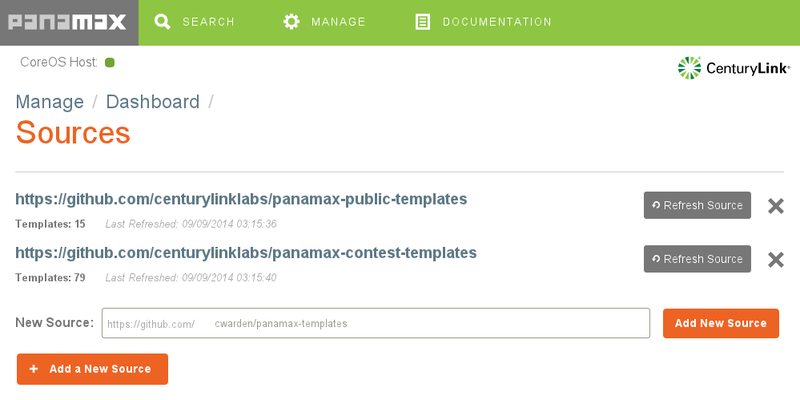
Searching for Panamax Templates and Docker Images
Now, on the search screen, if you search for "cube", you'll find my template.
(The first one is from the contest repo.)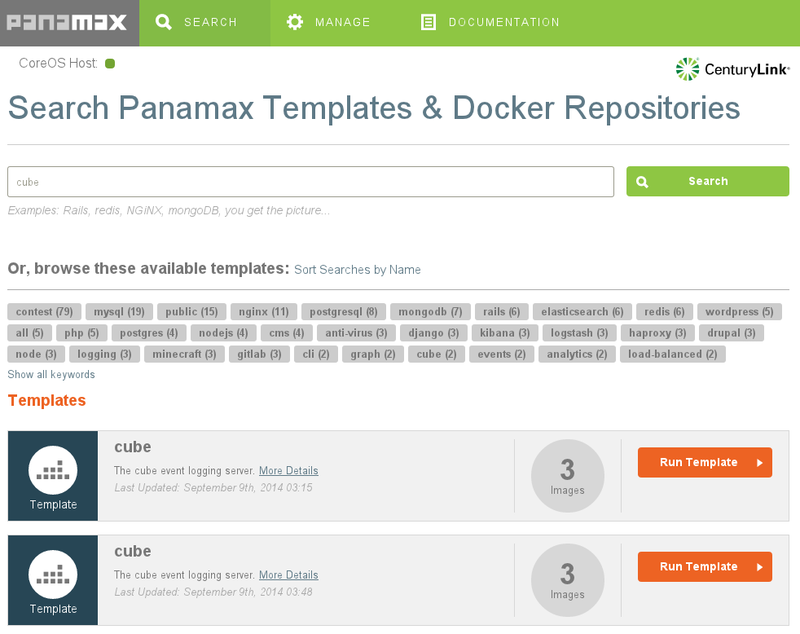
Below the templates, you'll also find individual docker images. If you wanted to build up your application starting from a single image, you could start with one of these.
Click on More Details, and you'll see that my template is made up of three docker images: a MongoDB database, the cube collector, which accepts events and stores them in the database, and the cube evaluator, which reads data out of MongoDB and computes aggregate metrics from the events.
The details modal window also shows documentation I wrote up when creating the template.
Creating an Application
Click on Run Template. This will create a new application called "cube".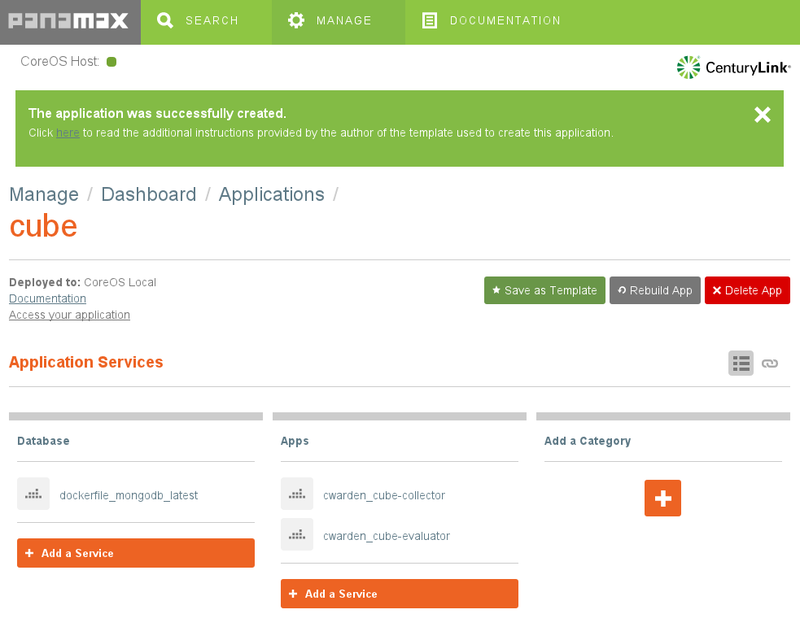
The Documentation link will show the same notes as on the More Details screen. The Port Forwarding section is important. Recall that Panamax and all of the docker containers it manages are running within a VM. If we want to access any of the services provided by these containers from outside the VM, we need to set up port forwarding.
In this case, we're going to add another docker container which sends data to the cube collector, but we'll want to access the cube evaluator from our host machine to make sure the logging is working correctly, so we need to set up port forwarding to VM for the evaluator:
$ VBoxManage controlvm panamax-vm natpf1 evaluator,tcp,,1081,,1081
(Instructions for sending data to the collector from the host machine are also included in the documentation.)
Prepare An App To Use With The Template
We'll use Valera Tretyak's simple hello world app for our application, making a small change to log each request to the cube collector.
Then we can create a docker image for this app and upload it to the Docker Hub.
$ docker build -t cwarden/hello-cube .
$ docker push cwarden/hello-cube
Extending The Template To Create a New Application
Now, let's actually use the template as a template by adding our new image as
another container. From Manage | Manage Applications | cube, let's add the
hello-cube service.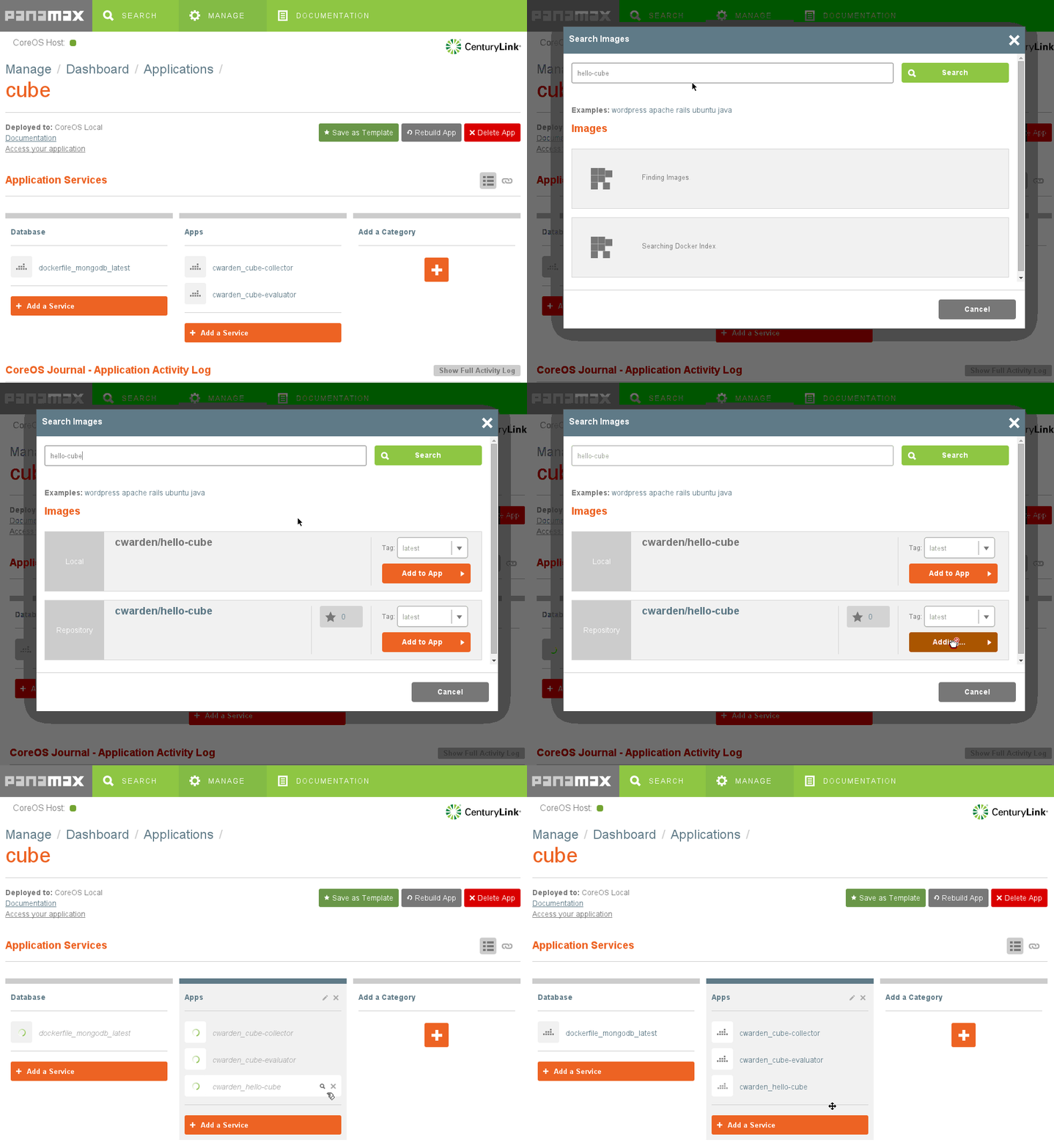
Next, we need to link the new container to the cube collector so it knows the
hostname and port to use when sending events. We also need to expose the
container's port to the VM. Click on the hourglass next to the hello-cube app.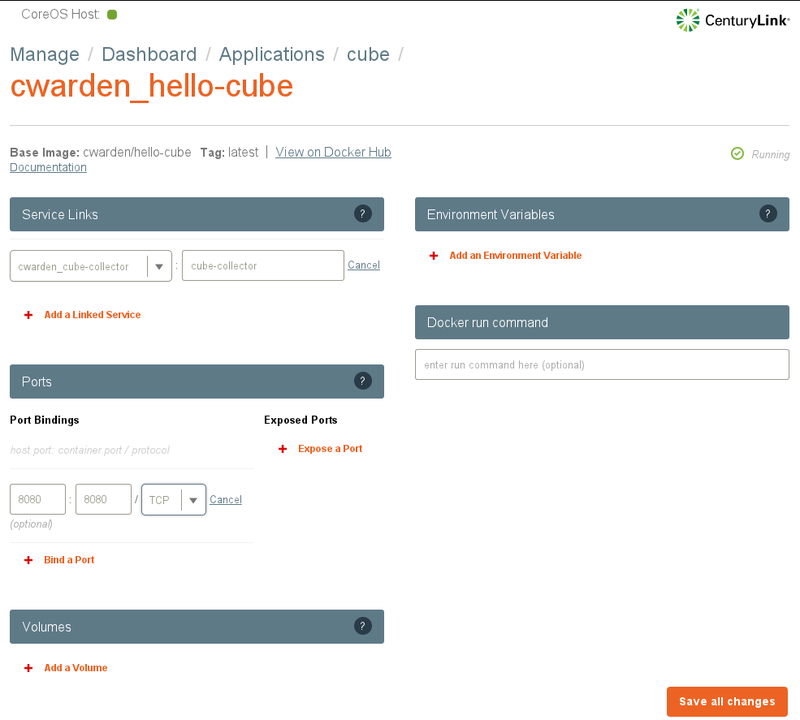
And we need to expose the VM's port to the host machine.
$ VBoxManage controlvm panamax-vm natpf1 hello,tcp,,8080,,8080
Using The New App
When we access the app on localhost:8080, it will send an event to the cube collector. We can use the cube evaluator to monitor the number of events being generated.
Exporting An App As A Template
Now that we've finished building our app, we can export the app as a new template to a github repo using the Save as Template button.